

We'd Love to Hear From You
Whether you have questions about your policy, need assistance with a claim, or are looking for personalized insurance advice, the team at Duliban Insurance Brokers is here to help.
Contact us today, and a member of our team will respond as quickly as possible.
Looking to speak with a broker directly? We offer in-office appointments and personalized support to help you find the right coverage with confidence.
Not a Client?
Contact Us Today
In-Office Appointment Hours
Monday to Friday: 10:00 AM – 4:00 PM
Phone Support Hours
Monday to Friday: 8:30 AM – 4:30 PM
Saturday: 9:00 AM – 2:00 PM
Call Us Today
Visit One of Our 4 Locations
CURRENT CLIENTS
Already a Duliban Insurance Client?
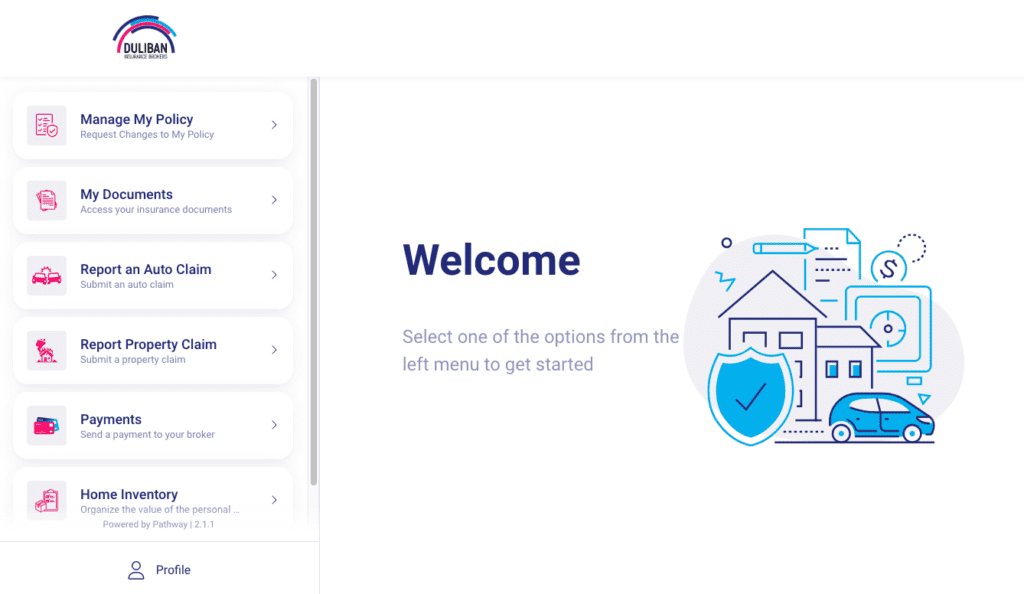
If you are already a Duliban Insurance client, you have access to our convenient self-serve client portal. The portal offers you 24/7 access to your policy, where you can:
- Submit policy change requests
- Access and/ or update your billing information
- Access policy documents, including your liability pink slip
- Report a claim
- Access roadside assistance
- Submit general inquiries
Client Portal Learning Centre and FAQ
For account security, the PIN assigned to you only remains active for sixty minutes. If your PIN is not working, it’s most likely that it has expired and you will need to re-submit your email to reactivate a new one. This is a timely action, and we recommend only requesting a PIN when you intend on following through with the next steps, promptly.
Clicking on a document or ePinkSlip opens the document preview. To view the full document and unlock the ability to print or save the file, click the + in the bottom right-hand corner to open the document menu. From there, select ‘download’ and the full PDF document will be shown.
If it appears there is only one email associated with your account, you may have previously given us an alternate address for contact or we may have made a spelling error when inputting your details. Please inquire with our team to verify the email address.
If there are two, or even three email addresses associated with your account, the Self-Serve Client Portal will be linked to the first email address that we have listed on your profile. This means that the owner of this email must login to the portal and add additional users to the account which will then be able to access it from their chosen emails.
Your unique PIN should arrive in your inbox within five minutes of the request (or less.) Make sure to check your junk or spam folders, just in case. If you have not received a PIN after five minutes, please add [email protected] to your email contact list and try again. If the issue persists, please reach out to our team.
The ‘add to wallet’ feature for ePinkSlip downloads using a .pkpass file format, which is designed specifically for the Apple Wallet (available with iOS6 or greater.)
Android or Windows users can still use this feature by installing any digital wallet app that is compatible with .pkpass files. The ePinkSlip company recommends the free Pass 2U Wallet for those who operate on an Android. You can find this in the app store on your device.

visit one of our four locations
Our office locations
Would you rather meet in person? Several of our locations offer convenient walk-in hours where you can make an appointment or meet with a broker directly.